Many contractors, especially trade-based subcontractors, assume DCAA compliance is only a "prime contractor problem." It isn't. Electrical, plumbing, HVAC, and general contracting subcontractors doing government facility, base, or municipal work face the same fundamental risk: sloppy timekeeping jeopardizes payment, even without a full audit.
This guide covers the basics of DCAA timekeeping rules, how time data flows into your financial reports, and how to pick tools that fit your contractor size, without drowning smaller shops in enterprise complexity.
Key Takeaways
- Labor hours drive billing, making timekeeping the most scrutinized compliance area
- Daily entries, dual approvals, and traceable corrections keep recordkeeping audit-ready
- Miscoded time skews indirect rates, job profitability, and future bid pricing
- Software needs scale with contractor size; small subcontractors rarely need full ERP systems
Why Time Tracking Is the Backbone of Government Contractor Compliance
On cost-reimbursable and time-and-materials contracts, labor hours are the primary billing driver. Unlike material purchases, there's no third-party invoice proving the hours happened. That's exactly why the Defense Contract Audit Agency treats timekeeping as an area of "utmost concern."
DCAA's guidance requires Total Time Accounting (TTA), meaning employees record all hours worked, direct and indirect, paid and unpaid. Recording only "billable" hours understates the true labor base used to calculate indirect rates, which skews every future proposal.
Floor Checks: Real-Time Verification, No Warning
DCAA's floor check program (classified as Mandatory Annual Audit Requirement 6) sends auditors on-site, usually unannounced, to verify that employees exist. They confirm workers are on the tasks they've logged and compare their answers against payroll and labor-distribution records.
According to DCAA's own audit program guidance for major contractor labor floor checks, significant offsite locations should see at least one check every three years. Frequency increases based on materiality and prior deficiencies.
This is precisely why retroactive, end-of-week logging is risky. If an auditor asks a technician what they did on Tuesday and the answer doesn't match the timesheet, that's a red flag, even if the mismatch was an honest memory slip.
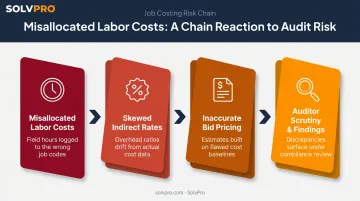
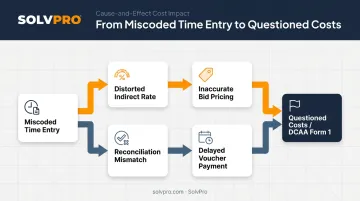
The domino effect of bad timekeeping:
- Misallocated labor costs distort job profitability reports
- Skewed labor pools inflate or deflate indirect (fringe, overhead, G&A) rates
- Bad rate data leads to inaccurate future bid pricing
- Auditors flag inconsistencies, triggering deeper scrutiny
The financial stakes are real. In one enforcement case, Consolidated Nuclear Security agreed to pay $18.4 million to settle allegations it billed the Department of Energy for hours employees never actually worked. That's an extreme example, but it illustrates how labor mischarging escalates from a paperwork issue into a legal one.
Subcontractors doing base or municipal work don't face DCAA floor checks directly in most cases. But missed hours or misclassified labor still put payment at risk, since primes flow down their own documentation requirements and won't absorb the cost of your errors.
DCAA Timekeeping Requirements Every Government Contractor Must Follow
Whether you're a prime under full audit scope or a subcontractor trying to stay disciplined, the underlying controls DCAA expects look remarkably similar.
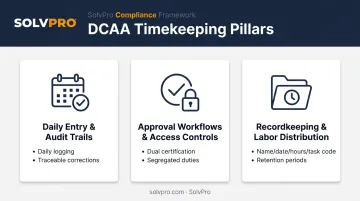
Daily Time Entry & Audit Trails
Employees should log their own hours daily, not weekly, and not from memory three days later. DCAA's guidance is explicit that supervisors shouldn't complete an employee's timesheet, except during extended authorized leave.
Corrections also need a clear trail. DCAA guidance calls for correction procedures that preserve the original charge, show the corrected charge, and document the employee's concurrence with the change. In practice, that means:
- The original entry is never simply overwritten or deleted
- Any edit is tied to a specific reason
- The employee affected acknowledges the correction
Approval Workflows & Access Controls
Timekeeping runs on dual accountability. First, the employee certifies their own hours and cost objectives. Then, a supervisor reviews and approves before the entry becomes final.
Access matters too. DCAA calls for segregation of duties: a supervisor accountable for a contract's budget shouldn't be the one initiating time charges on it. Practically, that means:
- Only the employee and their authorized approver can edit a given timesheet
- Payroll processing stays separate from time entry initiation
- Approval isn't optional or skippable under deadline pressure
Recordkeeping & Labor Distribution
Every time record needs to show the employee's name, dates worked, hours, and the specific project or task code. That level of detail is what makes labor distribution possible: tying recorded hours to the correct contract or cost objective so billing reflects reality.
Once records are accurate, the next question is how long to keep them, and retention isn't one-size-fits-all. FAR requires 2 years for time-and-attendance cards, 4 years for payroll records, and generally 3 years after final payment for broader audit records tied to the contract. The applicable period depends on the specific record type.
From Timesheets to Financial Reports: Job Costing, Indirect Rates & Audit Readiness
Time data isn't just a compliance checkbox. It's the raw material for every financial report your accounting team produces.
Job costing starts with accurate labor mapping. If you code hours to the wrong contract or task, your profitability report for that job is wrong, and so is the report for whatever job absorbed the misdirected hours. You end up managing two inaccurate numbers instead of one accurate one.
How Miscoded Time Distorts Indirect Rates
You calculate fringe, overhead, and G&A rates by dividing an indirect cost pool by an allocation base, often built from labor hours or labor dollars. When you miscode time between direct and indirect categories, the effects ripple outward:
- The indirect rate calculation shifts, even though total costs stayed the same
- You price future proposals using a distorted rate
- You either underbid and lose margin, or overbid and lose competitiveness
DFARS accounting system requirements (252.242-7006) specifically require you to identify labor by cost objective and distribute it accurately, direct and indirect alike. That requirement exists precisely because rate distortion compounds over every future contract you price.
The Cash Flow Connection
Rate accuracy matters beyond pricing, too — on cost-reimbursable contracts, you get paid only when invoices include a statement of allowable, incurred costs. If time entries are late, incomplete, or don't reconcile against payroll, reviewers can kick back that voucher instead of paying it.
Reconciliation is your safety net. Comparing labor distribution reports against payroll and billing records regularly, not just at year-end, catches discrepancies while they're still small enough to fix quietly. If you leave them unchecked, they show up as the kind of finding a DCAA Form 1 questioned-cost notice flags.
What to Look for in Time Tracking & Financial Reporting Software
Not every contractor needs the same tool. But certain features are non-negotiable regardless of size:
- Daily entry support that makes logging hours fast enough that crews actually do it in real time
- Tamper-proof audit trails that preserve original entries and log any corrections
- Supervisor approval workflows built into the system, not handled over email
- Mobile access for field crews who aren't sitting at a desk
- Direct accounting integration (like QuickBooks Online sync) so hours entered in the field don't need re-entry by office staff
That last point matters more than it seems. Manual re-entry between a time tracking app and accounting software is where reconciliation errors creep in, and where labor distribution reports stop matching payroll.
The right tool changes with company size, but the standard for accurate records doesn't. Large DCAA-audited primes juggling CAS-covered contracts and multiple business systems often need full ERP platforms like Deltek Costpoint or Unanet, built for that scale of complexity. Smaller subcontractors and trade businesses generally don't need that overhead. What they need is a simpler system that still produces clean, auditable, job-coded time records without a six-month implementation. SolvPro delivers that: daily time entries, supervisor approvals, and built-in QuickBooks Online sync, without the enterprise overhead.
How SolvPro Helps Government Subcontractors and Trade-Based Contractors Stay Organized
SolvPro is a field service management platform built for growing trade and service businesses, including those taking on government facility, base, or municipal work as subcontractors.
Event-based geolocation tracking is a core piece of this. Time entries, photo uploads, and activity logs are geo-stamped, creating a built-in record of when and where crews clocked in on a job.
For a subcontractor who never sees a DCAA floor check but still needs to defend billed hours to a prime, that kind of location-verified record carries real weight.
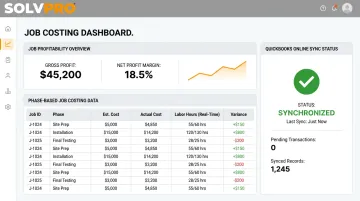
Job costing works the same way. Phase-based job costing ties labor hours to specific jobs, and that data flows into real-time profitability reporting, no manual spreadsheet required.
Combined with native QuickBooks Online sync, office staff see job costs and labor hours reflected in their accounting system without a second round of data entry or an end-of-month reconciliation scramble.
A few practical details worth knowing:
- Setup takes under 10 minutes, from account creation to dispatching your first work order
- The platform is fully bilingual in English and Spanish, for both field crews and office administrators
- Time can be logged via manual entry or live timers, directly from the job site
Where the Compliance Line Gets Drawn
One honest caveat: prime contractors under full DCAA audit scope, with CAS coverage and formal business system reviews, will likely need specialized compliance systems layered on top of a platform like this.
SolvPro is built for the subcontractor and trade contractor layer of government work. Disciplined, auditable time tracking matters just as much here, but the compliance apparatus around it is lighter.
Best Practices to Stay Compliant Without Slowing Down Your Team
` since fewer than 5 substantive issues were identified and none rise to CRITICAL or budget-justified IMPORTANT fixes. The section already meets Supporting H2 requirements: concise 2-line intro, single well-formed numbered list (1 visual element, meeting the 1-2 minimum), parallel action-verb-led items with brief context (not bare instructions), no redundancy, no AI-pattern phrases, and clean markdown.
Compliance shouldn't mean grinding your crew's day to a halt. A few habits go a long way:
- Write a simple time entry policy. One page, plain language, no legal jargon. Train on it during onboarding and again quarterly.
- Review timesheets and labor distribution reports on a schedule, not just when something looks off. Weekly spot-checks catch problems while they're cheap to fix.
- Assign one person to own approvals. An office admin or PM who checks weekly for missing entries, late approvals, or obvious coding errors keeps small issues from becoming audit findings.
Frequently Asked Questions
What is the best ERP for government contractors?
Large DCAA-audited primes typically need ERPs like Deltek Costpoint or Unanet for full compliance across business systems. Smaller subcontractors and trade businesses usually do better with simpler, integrated platforms that still support solid job costing and time tracking.
What is the best way to track time as a contractor?
Daily mobile time entry tied to specific project or task codes, backed by supervisor approval and an automatic audit trail, keeps records accurate and audit-ready without adding administrative burden.
What is DCAA compliance and why does it matter for time tracking?
DCAA compliance means adhering to federal cost accounting standards for government contract work. Timekeeping is one of the most heavily audited areas since labor charges directly drive contract billing and indirect rate calculations.
What happens if a contractor fails a DCAA timekeeping audit?
Consequences can include questioned costs, delayed or withheld payments, and required system remediation. DFARS 252.242-7005 permits up to 5% withholding for a significant accounting system deficiency, and repeated issues can jeopardize future contract awards.
Do small subcontractors need a DCAA-compliant time tracking system?
Full DCAA certification is typically required only for prime contracts above certain thresholds. Subcontractors still benefit from disciplined, auditable time tracking since it directly protects billing accuracy and payment timing with the prime.
How long should government contractors retain time and labor records?
FAR sets record-specific periods: 2 years for time-and-attendance cards, 4 years for payroll records, and generally 3 years after final payment for broader audit records. Always confirm specific retention terms in your contract.